A tiny friend for your Mac.
Buenjo walks your screens, keeps your day on track, and gets into all sorts of trouble. Private by design: it all runs on your Mac.
Coming soon to Mac
See what's free Available for Mac · coming soon
For macOS 11 or later · Free to start
Tue 9:55Meeting in 5 min. Want the Zoom link?
JoinLaterMeet Buenjo
Small. Busy. Easily distracted.
Buenjo lives along the bottom of your screens and treats your windows like a playground. It reacts to what you do, and it's never short of visitors.
Out for a stroll
Along the bottom of your screens, across every monitor.

Up the wall
It hops onto your real windows and climbs up for a look around.

Company
A bird lands on its head. A butterfly drops by. A paper airplane arrives with a note.

Up top, Max!
Their friend Max stops by for a high five.
Actually helpful
Your day, handled.
Talk to Buenjo in the chat window, in plain words. It keeps track, and it speaks up at the right moment.
Morning
A briefing when you sit down
Today's meetings, what's due or overdue, and how yesterday went.

Midday
Just say it
Type
remind me to send the invoice Friday 3pm
in the chat window. To-dos can have days, times and repeats, with a reminder at the time.
Meeting
A heads-up, link ready
Five minutes before a meeting, Buenjo offers to open the Zoom, Meet or Teams link. Say
join my meeting
and it opens. Then it goes quiet.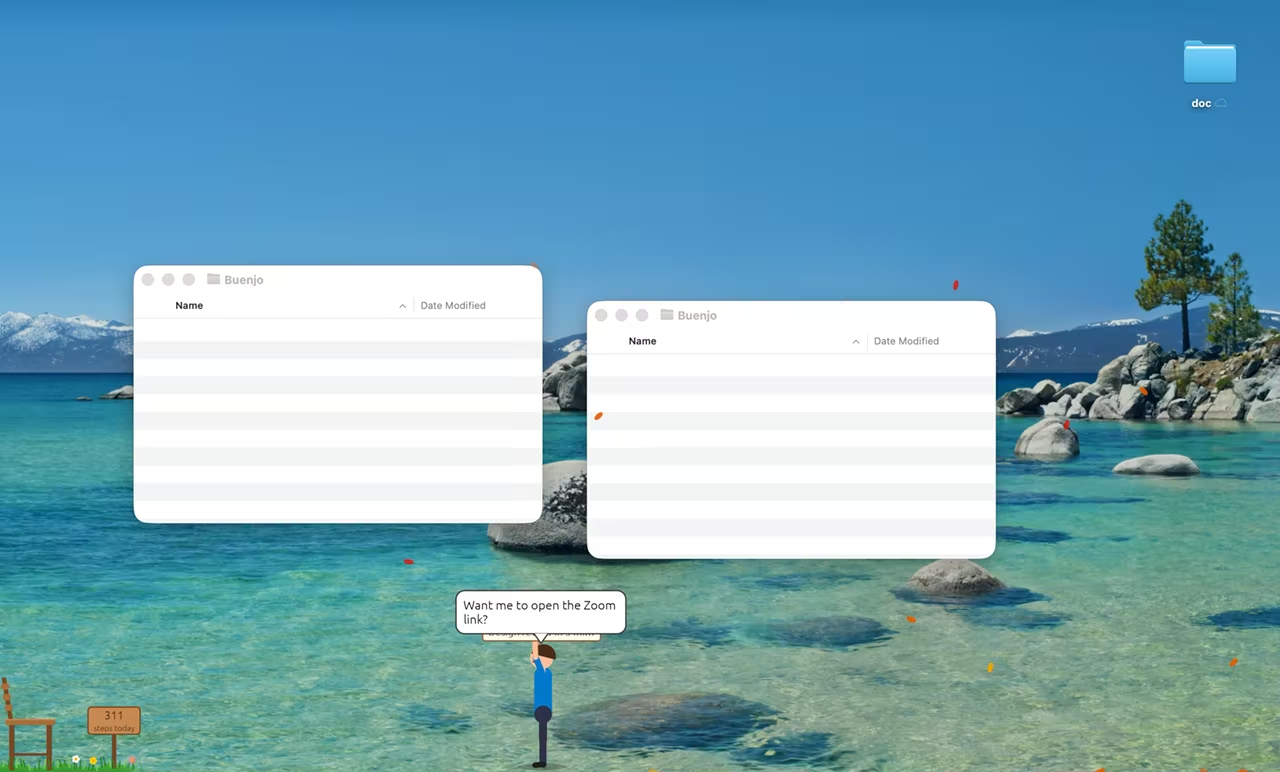
Evening
A wrap-up to close the day
What got done, what's left, your focus time and your breaks.

Also on hand: pomodoro timers, water and stand-up nudges, mood check-ins, a gratitude journal, time at the computer, battery warnings, finished downloads, and Mac controls for volume, dark mode, opening folders and finding files.
Tools
Handy, too.
Ask in plain words. It does the Mac chores, with a bit of a show.
Close and quit
It shoots a window’s close button with a bow (the default), a slingshot or a rifle. It can quit an app and answer its “Save changes?” for you.
Windows, arranged
Two apps side by side, one snapped to half the screen, one filling the screen or shrunk down. Minimize everything, or bring an app to the front.
Gadgets
A screenshot, keeping your Mac awake, a colour picker (the hex is copied for you), “what was I working on?”, finding your cursor, volume and mute.
Tidy up
Desktop screenshots swept into a folder, Downloads untouched for 30 days moved aside, desktop icons hidden while you present. Files are only moved, never deleted, and “put it back” undoes it.
Stickies, timers, a spotlight
Sticky notes that stay put, an hourglass timer, and a spotlight that dims everything except one window.
Say it your way
For example:
- “put Safari and Notes side by side”
- “close TextEdit without saving”
- “keep my computer awake for 2 hours”
- “tidy my desktop”
Most tools are Pro, and a Free account gets daily tool tries. Some ask for a macOS permission the first time (Accessibility, Screen Recording, or access to a folder). Buenjo never moves your mouse.
Signing in
Signs you in, when you let it.
Say “log me into github” and Buenjo opens the site in your browser and fills in your username and password for you.
Beta. The vault hasn’t been reviewed by an independent security firm. Whether to use it is up to you.
- Off until you turn it on. Switch on “Let Buenjo sign me in to websites from my vault” in the vault’s Settings. Until then, it won’t.
- Only on the right site. It fills in a login only on the site saved with it (or one of its subdomains), over https. Never a look-alike address, a frame from another site, a search box, or a “Sign in with Google” button.
- Kept on your Mac. Your logins are kept in a vault encrypted on your Mac (Argon2id and XChaCha20-Poly1305), unlocked with your passphrase or Touch ID. It’s never uploaded, and it works offline.
- In your browser. Safari, Chrome, Edge, Brave, Arc and Vivaldi. Safari fills in the password without telling the page; if a site ignores it, the password is copied for you to paste instead, and cleared after 30 seconds.
It fills the page through macOS Accessibility, on your Mac: no keys are typed and the mouse isn’t moved. It can’t tell whether a site at the right address has itself been compromised. And without your passphrase or recovery key, nobody can open the vault, not even Buenjo’s support.

Focus time
Gone to the beach.
When it's time to concentrate, Buenjo heads to a little beach: deck chair, umbrella, sunglasses, waves. The sky follows your clock. And it stays quiet.
In a meeting? Quiet mode switches on by itself while a meeting app is on screen.
Three modes
As busy as you like.
Pick a mode to suit the day. Switch any time.

Companion mode: Walks about, does little gestures, gets visitors and dances to music.

Work mode: Sits at its desk and keeps quiet. Reminders, meetings and to-dos carry on, and nothing fun happens of its own accord.

Play mode: About twice as many surprises, leaning to the big shows.
The shows
13 shows and counting.
Every so often, Buenjo puts on a show. Some start on their own, and you can ask for any of them from the Shows tab or in the chat.

BMX show
Ramps, backflips and tailwhips across all your monitors, with a score at the end.

Twister
A tornado spins Buenjo up, then pinballs them off your window edges.

Eagle
It circles, it dives, and off they go, dangling across your screens.

Diving show
Five dives off a springboard, scored by three judges. Belly flops splash.

Tightrope walk
A rope strung between two of your real windows. Move a window and the rope follows.

Human cannonball
A crash-test dummy goes first. Then BOOM: across every monitor, aiming for the bullseye.

Magic show
The Great Buenjini: a rabbit from a hat (or a pigeon), levitation, and sawing Max in half.
Skydiving
Out of a plane, a freefall flip, the parachute, and a landing on the bullseye.

Rock concert
Guitar, a drum solo, pyro on the speakers, and a stage dive into the crowd.

Rocket launch
A cardboard rocket, a countdown from ten, lift-off, and back with a moon rock.

Kaiju attack
A giant monster foot stomps across your screens. A cookie saves the day.

Oops! The Stone
A stone bounces, flies at you and “cracks” your screen. (It doesn’t really.)

Bandit chase
A bandit snatches something and runs, over your windows and across your monitors.
More shows on the way
And then some
Weather, games and homes.
Snow on your desktop, games you play with the mouse, and six places to call home.
Weather

Snow
And yes, they build a snowman.

Rain and storm
Up goes the umbrella.
Fireworks
Cheering and clapping.

The UFO
An abduction. Briefly.
Also autumn leaves, fog, a rainbow, wind, meteors, confetti, bubbles, balloons, disco and an earthquake. Seasonal ones arrive in their season.
Games
Catch the Stars
Lead them with the mouse.
Balloon Pump
Let go before it pops.
Fishing
Click when the bobber dips.
Ball games
Aim at soccer, golf, basketball and bowling.
Plus Sky Shooter, Whack-a-Bandit and Dogfight, and rides: skateboard, skiing, snowboarding and surfing.
Homes

The bench

The nipa hut (bahay kubo)

The lookout tower

The campfire

The moon swing

The hot-air balloon
Six home bases to pick from, the nipa hut among them. Between outings, Buenjo heads home for a sit.

The long way back
Sometimes the walk back across the screen becomes a trip: a convertible, a biplane that catches fire (then a parachute), a swim with a shark fin behind, or a hot-air balloon.
Plus dances (the groove, the moonwalk, the macarena), a dog and a cat, a broom that tidies the desktop, a lasso, desk gadgets, and window antics like hide and seek. You can even steer Buenjo like a platform game with the arrow keys.
Private by design
It all stays on your Mac.
No AI service
Its replies are rule-based, and they stay on your Mac.
Runs on your Mac
Nothing you say to it leaves your Mac.
Never watches your typing
The helpers read only local things: your to-dos and reminders, your calendar if you allow it, your battery, and the front app's name.
No ads
And no selling data. Ever.
It speaks its lines with macOS's built-in voices, on your Mac. It can even use your own Personal Voice, if you've set one up.
Plans
Free to start.
Buenjo is free, with or without an account. Pro unlocks everything, with a 14-day free trial.
Without an account
Nothing to sign up for
Free
- The companion
- Everyday helpers: reminders, to-dos, nudges, quiet mode, Mac controls, alerts
- A few shows, weather, games and tools to try
Free account
Sign up in the app
Free
- Everything without an account
- More of the shows, weather, games and tools, with daily tool tries
- A calendar heads-up a day
Pro Everything
For the full Buenjo
$3.99 / month
Or $29.99 a year (save 37%).
- Everything in the free account
- Morning briefing and evening wrap-up
- Dated to-dos, meeting prep, focus time, history and wellbeing
- Unlimited calendar heads-ups, and Work mode's working hours
- Every show, weather, game, ride, trip, dance, pet and home, plus capes and special hats
14-day free trial. Start it in the app. It needs a confirmed email and no card.
Subscribing happens in the app: open Account → Subscribe. You pay through Stripe, and you can manage or cancel any time from Manage subscription. Prices in USD.
Questions
Is it free?
Yes, to start. Buenjo is free without an account, and a free account adds a little more. Pro unlocks everything for $3.99 a month or $29.99 a year. Pro comes with a 14-day free trial, with no card needed. Compare the plans.
Does it work offline?
Yes. Buenjo runs on your Mac and works offline. It goes online only for your account, plan checks (your plan keeps working for up to 3 days offline) and update checks.
Does it use AI?
No, and that's on purpose. Buenjo's replies are rule-based and worked out on your Mac. There's no AI service, and nothing you say to it leaves your Mac.
What does it see on my Mac?
Only what its helpers need: your to-dos and reminders, your calendar if you allow it, your battery, and the name of the app in front. It never watches what you type. Read the privacy policy.
Which Macs?
Any Mac with macOS 11 or later. Buenjo is built natively for the Mac, and it's Mac-only.
Can I use it on two Macs?
An account works on one Mac at a time. You can move it to another Mac.
How do I cancel?
In the app, go to Account → Manage subscription. You can cancel any time. See the refund and cancellation policy.
Does it slow my Mac down?
It's lightweight. And if you want it to settle down, switch to Work mode or quiet mode any time.
Can I turn the fun off while working?
Yes. In Work mode, Buenjo sits quietly at its desk and nothing fun happens of its own accord, while reminders, meetings and to-dos carry on. Quiet mode also switches on by itself while a meeting app is on screen.
Has the vault had a security review?
Not an independent one. The vault is a beta: it hasn't been reviewed by an independent security firm, and whether to use it is up to you. The app says so too, before you make a vault and in its settings.
Do my vault logins ever leave my Mac?
No. The vault is encrypted on your Mac and never uploaded, and nothing in it goes to Buenjo's servers. When you let Buenjo sign you in, your browser opens the website as usual, and the username and password go only into that site's sign-in form.

Say hi to Buenjo.
A tiny friend for your Mac, keeping your day on track. Privately.
Coming soon to Mac
See what's freeAvailable for Mac · coming soon
For macOS 11 or later · Free to start